Custom Traversal Animations
How I created custom traversal animations for heights that were not provided.
Prerequisites
This is how I personally made my animations. There may be other solutions for other software, or maybe even something much simpler I missed
- Blender 3.6
- I found that importing xanims in Blender 4.0 or above caused errors with the plugin
- pv_blender_cod
Importing Existing XAnim
- Open Blender 3.6 and select
File > Import > Import XModel - Navigate to
Call of Duty Black Ops III\model_export\base_characterand openbo3_base_character.XMODEL_BIN - Select
File > Import > Import XAnim - Navigate to your
Call of Duty Black Ops III\xanim_export\ai\zombieand open the closest XAnim to the one you want to create
Modifying Existing XAnim
- Select
Pose Modeand then select the armature'stag_origin
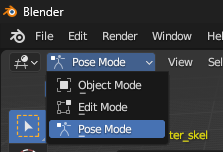
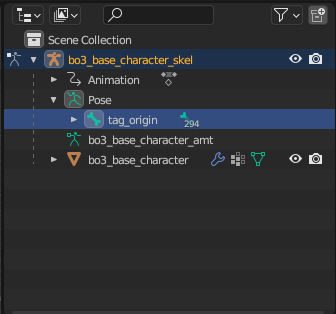
- Open the
Graph Editor
Do this in a new window if you know how. Not necessary but helpful for seeing what you're doing
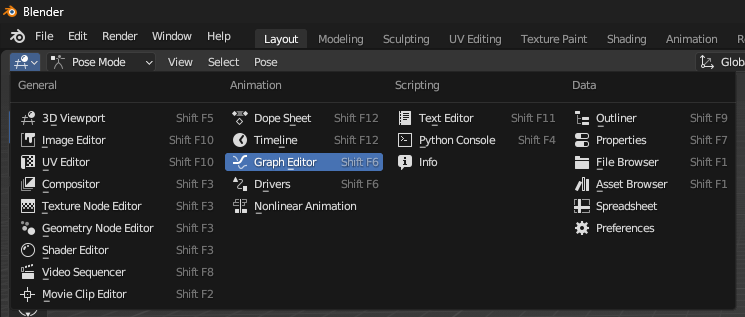
- Double click the
Z Location (tag_origin)to highlight the vertical height graph
You may want to play around with the graph more than outlined here. This is intended to be a very simple guide to get something working
- Press
S(scale), thenY(vertical), and type the amount to scale by.
ai_zombie_base_jump_up_160, I would do 200 / 160 which is 1.25- You'll notice the start of the line move up from 0. To fix this select any of the keyframes that were originally at 0 and copy the value of the
Active Keyframe
-0.508683 m- Press
G(move), thenY(vertical), and type the inverse of the value of the active keyframe
0.508683Exporting Modified XAnim
- Select your entire armature and press
Ato select all of the bones - Select
File > Export > Export XAnim - Ensure
Binary (Bin)is selected,Use Notetrackis unchecked, andExport All Actionssays(1 actions) - Export to
Call of Duty Black Ops III\xanim_export\ai\zombieand name it the same as the one you imported, but with the height number changed
ai_zombie_base_jump_up_200.xanim_bin- Open APE, and copy the XAnim into your GDT and name it to match the file name
- Select your new
Anim File - Use it in your node_negotiations or wherever else you'd like!